Ages 6–15초1–중3 Math & science · Levels 1–9수학·과학 · 레벨 1–9

Math and science you can see. 눈으로 보는
수학과 과학

Short, wordless lessons where characters move real things, and every number on screen matches what you see. Nine levels take kids from first counting to curved graphs. 캐릭터가 직접 옮기고, 나누고, 재는 말 없는 짧은 수업이에요. 화면 속 숫자는 언제나 눈에 보이는 것과 똑같아요. 9개 레벨로 첫 셈부터 곡선 그래프까지 이어져요.

  • Works in any language어느 나라 말이든 OK
  • Math checked by code수학은 코드로 검사
  • No ads, no sign-up광고·가입 없음

How it works이렇게 배워요

Shown, not told.설명하기 전에, 먼저 보여 줘요.

Each lesson is one small scene. Characters stack blocks, pour water, and cut cakes, and the math appears only after you have seen it happen. 수업 하나는 작은 장면 하나예요. 캐릭터가 블록을 쌓고, 물을 붓고, 케이크를 자르면, 그 모습을 본 다음에야 수학이 나타나요.

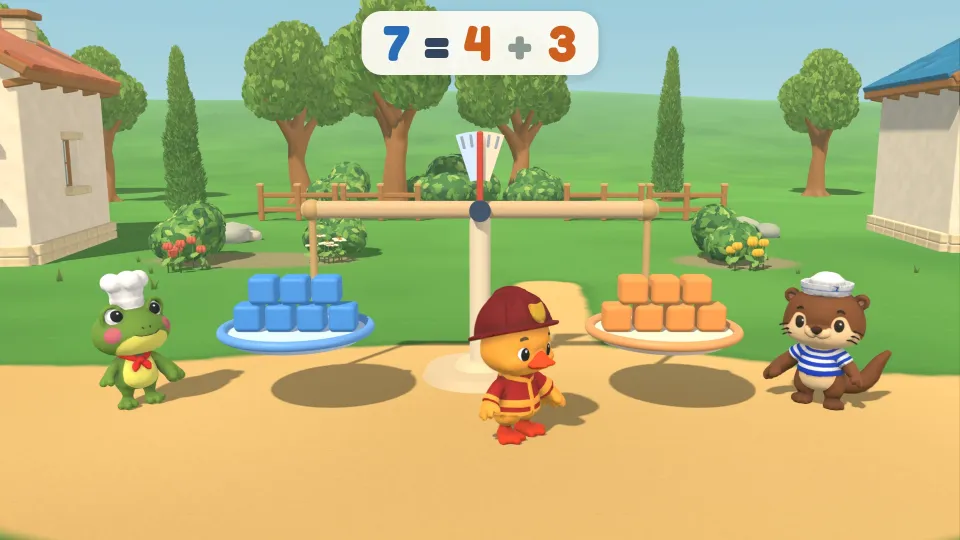
A frog chef, a duck, and an otter beside a level balance scale with seven blue blocks on one side and four plus three orange blocks on the other. The sign reads 7 = 4 + 3.

Characters do the math캐릭터가 직접 해 봐요

A frog chef lifts seven blocks onto a scale and an otter adds four. The beam tips, and only then does 7 > 4 appear. Three more blocks bring it level: 7 = 4 + 3. 개구리 요리사가 블록 7개를 저울에 올리고 수달이 4개를 올려요. 저울이 기운 다음에야 7 > 4가 나타나요. 3개를 더 올리면 수평이 돼요. 7 = 4 + 3.

Levels 1–2레벨 1–2 Math수학 In the studio제작 중
199,688 checks번 검사
0 errors오류 0개

Drawn by code, checked like a test코드로 그리고, 시험처럼 검사해요

Counts, equations, and balances are calculated, never placed by hand. Before release, our 2 Times Table video was checked at 1,638 moments. 개수·식·저울 기울기를 손으로 맞추지 않고 계산해서 그려요. 2단 영상은 공개 전에 1,638개 순간을 검사했어요.

A quiet moment to guess먼저 예상하는 조용한 순간

Before the answer, the scene goes still for a few seconds. Kids guess first, then watch to find out. 답이 나오기 전에 장면이 몇 초 동안 조용히 멈춰요. 아이가 먼저 예상하고, 이어서 확인해요.

1 Look1 보기 2 Guess2 예상 3 Check3 확인

No words needed말이 필요 없어요

Motion, sound effects, and numbers do the talking instead of narration, so a lesson works the same in Seoul, São Paulo, or Seattle. 내레이션 대신 움직임·효과음·숫자가 말해 줘요. 그래서 서울에서도, 상파울루에서도, 시애틀에서도 똑같이 볼 수 있어요.

Level map레벨 지도

Nine levels. One staircase.9개 레벨, 한 계단씩 올라가요.

Levels follow skills, not birthdays. Pick a school grade to see where to start, then move up or down freely. Each stage changes how ideas are shown: objects first, then pictures, then symbols. 레벨은 나이가 아니라 할 수 있는 것을 기준으로 해요. 학년을 고르면 시작할 레벨을 알려 드려요. 쉬우면 올라가고, 어려우면 내려오면 돼요. 단계마다 보여 주는 방법도 바뀌어요. 물건에서 그림으로, 그림에서 기호로.

Where should we start?어디서 시작할까요?

School grades line up differently around the world. We matched Korea, the US, the UK, Japan, Australia, and Singapore for you. 나라마다 학년 체계가 달라요. 한국·미국·영국·일본·호주·싱가포르 학년을 레벨에 맞춰 두었어요.

Now showing지금 볼 수 있어요

Press play. Pause. Guess.재생하고, 멈추고, 예상해 봐요.

Our first lessons are on YouTube. They are wordless, so any family can watch together in any language. 첫 수업들이 YouTube에 올라와 있어요. 말이 없는 영상이라 어느 나라 가족이든 함께 볼 수 있어요.

Coming from the studio스튜디오에서 만드는 중

Prototype scenes from Lumi Grove. Characters and details may still change. 루미숲에서 만들고 있는 시제품 장면이에요. 캐릭터와 세부는 바뀔 수 있어요.

See all in the library콘텐츠 모음에서 모두 보기

Play직접 해 보기

Level 1 missions are open.레벨 1 미션이 열렸어요.

Explore Lumi Grove with five friends and solve 12 missions: compare, collect, sort, continue patterns, and spot shapes that have been turned. 루미숲 친구 다섯과 마을을 돌며 미션 12개를 풀어요. 비교하고, 모으고, 분류하고, 규칙을 잇고, 돌아간 모양을 찾아요.

  • Sunbeam Orchard햇살 과수원Count, compare, and collect세고, 비교하고, 모아요
  • Wonder Greenhouse호기심 온실Find what belongs together같은 조건의 친구를 찾아요
  • Whisper Windmill속삭임 풍차Discover repeating patterns반복되는 규칙을 찾아요
  • Little Makers Workshop꼬마 제작소Recognize shapes in new positions방향이 달라도 모양을 알아봐요
  • 12missions미션
  • 36activities활동
  • 3languages (EN · KO · JA)언어 (영·한·일)
  • 0timers시간 제한

Free, with no account. Progress is saved only in this browser. 무료이고 가입이 필요 없어요. 진행 기록은 이 브라우저에만 저장돼요.

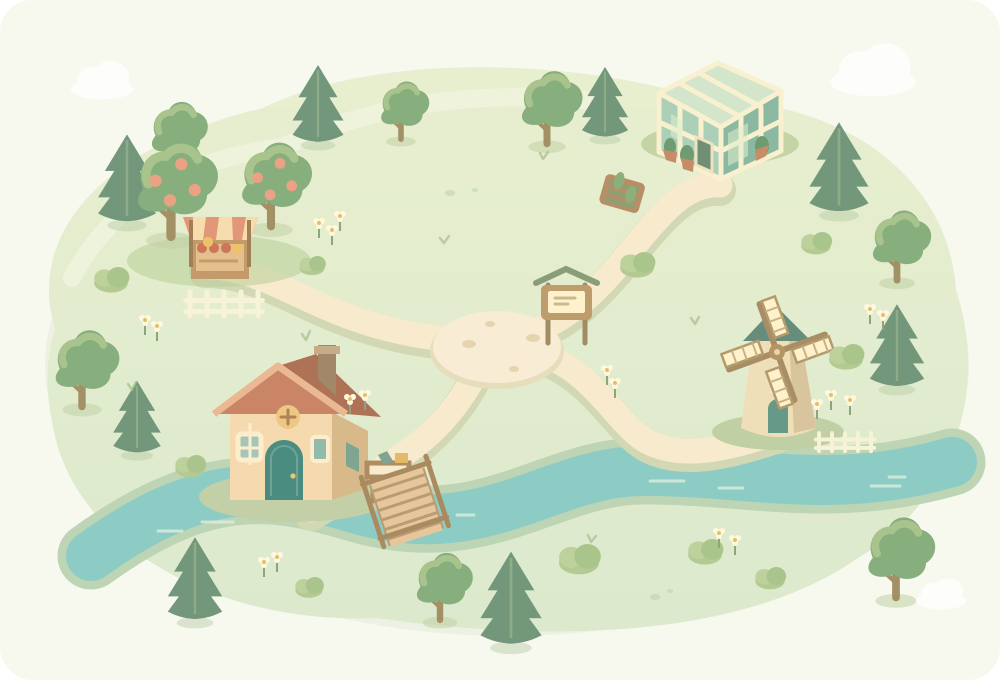
Map of Lumi Grove village with an orchard, a greenhouse, a windmill, and a workshop.

For grown-ups보호자와 선생님께

Five minutes. Three questions.5분, 질문 세 개면 충분해요.

You don't need to explain the math. Watch together and let these three questions do the work. 수학을 설명하지 않아도 괜찮아요. 함께 보면서 이 세 가지만 물어봐 주세요.

  1. 1

    Pause at the quiet moment조용한 순간에 멈추기

    When the scene goes still, pause the video too.장면이 멈추면 영상도 잠깐 멈춰 주세요.

    “What will happen next?”“다음에 어떻게 될까?”
  2. 2

    Play it and check재생해서 확인하기

    Watch what really happens, then talk about it.실제로 어떻게 되는지 보고 이야기해요.

    “Were you right? How do you know?”“맞았어? 어떻게 알았어?”
  3. 3

    Try it with real things진짜 물건으로 해 보기

    Spoons, coins, blocks, a cup of water: rebuild the scene at the kitchen table.숟가락·동전·블록·물 한 컵으로 식탁에서 장면을 다시 만들어 봐요.

    “Can you show me?”“나한테 보여 줄 수 있어?”

Our promises약속할게요

  • No ads on this site이 사이트에는 광고가 없어요And no tracking cookies. We only count visits anonymously to learn which pages help.추적 쿠키도 없어요. 어떤 페이지가 도움이 되는지 방문 수만 익명으로 세요.
  • No accounts, no personal data가입도, 개인정보도 받지 않아요Missions save progress in your own browser and nowhere else.미션 진행 기록은 이 브라우저에만 저장돼요.
  • YouTube loads only when you press play재생을 누를 때만 YouTube를 불러와요Videos open in privacy-enhanced mode, and nothing loads before you ask.개인정보 보호 강화 모드로 열고, 누르기 전에는 아무것도 불러오지 않아요.
  • Levels are a guide, not a grade레벨은 안내일 뿐, 성적이 아니에요They are our own steps, not an official curriculum or certificate.우리가 만든 계단이에요. 공식 교육과정이나 자격 인증이 아니에요.

Questions자주 묻는 질문

Is it free?무료인가요?

Yes. Videos are free on YouTube, and Level 1 missions are free here with no sign-up.네. 영상은 YouTube에서, 레벨 1 미션은 이 사이트에서 가입 없이 무료로 볼 수 있어요.

Why are the videos wordless?왜 영상에 말이 없나요?

So the picture does the explaining. A child who can't read yet, or who speaks another language, sees the same idea. Sound effects mark each step.그림이 설명하게 하려고요. 아직 글을 못 읽는 아이도, 다른 나라 말을 쓰는 아이도 같은 내용을 볼 수 있어요. 단계마다 효과음이 신호를 줘요.

How do I pick a level?레벨은 어떻게 고르나요?

Start with the level finder above. If it feels easy, go up one level; if it feels hard, go down one. Math and science can sit at different levels.위의 레벨 찾기에서 시작하세요. 쉬우면 한 단계 올리고, 어려우면 한 단계 내려요. 수학과 과학 레벨이 달라도 괜찮아요.

Who makes Easy Little Lessons?누가 만드나요?

A small independent studio. We draw every scene with code (Godot and HTML) and run automatic checks on the math before anything is published.작은 독립 스튜디오예요. 모든 장면을 코드(Godot, HTML)로 그리고, 공개하기 전에 수학이 맞는지 자동으로 검사해요.

Can I use it in class?수업에서 써도 되나요?

Please do. Put a video on the big screen and pause at the quiet moment. Feedback from teachers is always welcome by email.물론이에요. 큰 화면에 띄우고 조용한 순간에 멈춰 보세요. 선생님들의 의견은 언제든 이메일로 반가워요.